
SideScholar
  • Discover
  • Insights
  • Education
  • Scholars
  • Schools
  • Career
  • Scholarships
SideScholarSideScholar
Search
  • Discover
  • Insights
  • Education
  • Scholars
  • Schools
  • Career
  • Scholarships
© SideScholar. All Rights Reserved.
Guides

How to Install KNUST AIM App for iPhone

Editorial
August 12, 2023

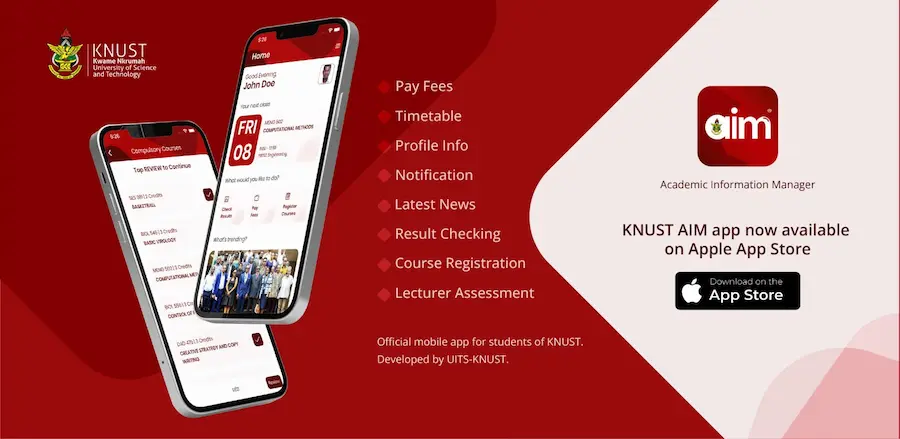
The Kwame Nkrumah University of Science and Technology (KNUST) has made available the Academic Information Manager (AIM) on the Apple iPhone Store.

Contents
  • Features of KNUST AIM App
  • How to Install and Set-up the KNUST AIM App
    • Download the KNUST AIM App from the Appstore:
    • Setting Up KNUST AIM App:
  • Accessing Your Semester Results with KNUST AIM App

Developed by the University Information Technology Services (UITS), the KNUST AIM App allows you to check your current and previous semester results, register your semester courses, check fees and download bills as well as access important updates and news directly from the university website.

Features of KNUST AIM App

The KNUST AIM App is designed to enhance your campus experience. With this app, you can effortlessly perform the following tasks:

  • Check current and past semester results.
  • Register for courses for the upcoming semester.
  • Review and pay fees, along with downloading bills.
  • Stay updated with the latest university news from the official website and more.

How to Install and Set-up the KNUST AIM App

For iPhone users at KNUST this simple guide will help you install and use the KNUST AIM App on your iPhone.

Download the KNUST AIM App from the Appstore:

  • Open the App Store on your Apple iPhone device.
  • Search for the “KNUST AIM” App.
  • Download and install on your phone to enjoy the features.

Alternatively, you can directly access the KNUST AIM App by visiting the following URL on your iPhone:
https://apps.apple.com/gb/app/knust-aim/id1632229714
On the page, tap “Get” next to the app.
Confirm the installation using your passcode, Touch ID, or Face ID.

Setting Up KNUST AIM App:

  • Launch the newly installed KNUST AIM App.
  • Provide your KNUST Student Number and tap “Next.”
  • Enter your username and password, then tap the “LOGIN” button.
  • Create a secure 4-digit pin code.

Accessing Your Semester Results with KNUST AIM App

Checking your semester results is now hassle-free with the KNUST AIM App on your iPhone. Here’s how:

  1. Launch the App: Open the KNUST AIM App that you have installed.
  2. Login: Sign in using your student credentials.
  3. Access Results: From the home screen, locate and tap the “Results” icon.
  4. Select Semester: Choose the specific semester for which you wish to view your results.
  5. View Results: Enter your 4-digit pin code to securely access and view your results.

Stay updated, manage your studies, and access essential university services with ease, directly from your iPhone with the KNUST AIM App as well as the other university platforms.


TAGGED:KNUST
Share This Article
Facebook Email Copy Link Print
Leave a Comment Leave a Comment

Leave a Reply Cancel reply

You must be logged in to post a comment.

Interests

7 Tips to Find Affordable Online Bachelor’s Degrees

College has always been seen as a major investment. For many students, the cost of tuition, housing, and transportation can…

Educational Hub

Starting Grad School After a Long Break from Undergrad

Going back to graduate school after several years away from university can feel intimidating. You might wonder whether you are…

Educational Hub

The Impact of Work Experience and Internships on Salaries in Ghana’s Job Market

For many young professionals in Ghana, one question comes up again and again: why do some graduates earn more than…

Career Insights

Why Executive Hiring in Ghana Requires a Tailored Approach

When it comes to hiring executives in Ghana, there’s one mistake companies can’t afford to make: assuming the same strategy…

Career Insights

7 Soft Skills Employers Will Demand Most in 2026

The global job market is undergoing a fundamental shift. Automation, artificial intelligence, and rapid digitization are reducing the long-term value…

Career Insights
Show More

Join our WhatsApp Channel

Join our Telegram Channel

Find us on LinkedIn 

Other Interests ↷

Starting your Freelance Journey With No Experience

Career Insights

Best Side Hustles for Students in Ghana

Career Insights
Academic Tools

Free Academic Tools Every University Student Should Know

Educational Hub

Networking Strategies That Actually Work for Young Professionals

Career Insights

How to Build a Personal Brand That Gets You Hired

Career Insights

Here Is How to Pay Your University of Ghana Fees With Momo/UGPay

Educational Hub
Show More
SideScholar

©2025 The SideScholar | All Rights Reserved

  • About Us
  • Privacy Policy
  • Terms of Use
  • Contact Us