

The University of Ghana’s Online Registration process is very simple and convenient for both newly admitted and continuing students. With just your student ID and assigned email, you can complete all registration tasks online.
This article serves as a guide for students, providing step-by-step instructions on how to register online for the academic year at UG Legon.
Remember, you will need your UG Student ID Number and UG 5-digit PIN that was assigned to you on admission to complete the online registration process. You can find this in your admission letter.
If you do not have this information, the website provides instructions on how to access your provisional admission letter, which contains the necessary details.
University Of Ghana Online Registration Procedures
Step 1: Payment Of Fees
The first thing you need to do when you get your admission letter is to pay the fees to secure your slot in the university. You need to pay the required minimum fee before you can do your academic and residential registrations.
The required minimum for the academic year is 50% of the stated academic fees; details can be found on your admission letter.
All students (Main Campus/Accra City Campus/Distance Education/Korle-Bu) are to pay their Academic Fees and, where applicable, Residential Fees at any branch of Standard Chartered Bank or ECOBANK with cash only.
Ensure that you quote your Student ID Number correctly on all the pay-in-slips (using a Fee Paying Voucher). Ensure that the information captured by the teller is accurate before leaving the banking hall.
Please note that online registration can only be done 48hours after payment has been made. Click to view the Schedule of Fees.
Step 2: Activate your UG Mail
After paying the fees, you need to wait at least 48 hours to go ahead with the registration. The first thing you should set up is your UGMail.
Remember, activating your UGmail is important because you will need the mail for your other academic registrations and information. Here is how to activate your University of Ghana UG Email Account (UGmail)
- First, visit mail.google.com/a/st.ug.edu.gh or simply mail.google.com
- Log in to your email account using the email (yourname@st.ug.edu.gh) and password (UgXXXXXXXX?) provided. (Where xxxxxxxx is your UG student ID).
- Next, you have to change the default password to your preferred password to complete the process.
- Enter a new strong password and then retype it again to confirm.
- Follow the rest of the on-screen instructions to complete your UGmail activation.
Step 3: Academic Registration Online
After 48 hours, once payment of fees has been completed, follow the general steps below to register for the academic programme offered. Note that you will be required to undertake your actual course registration after Orientation
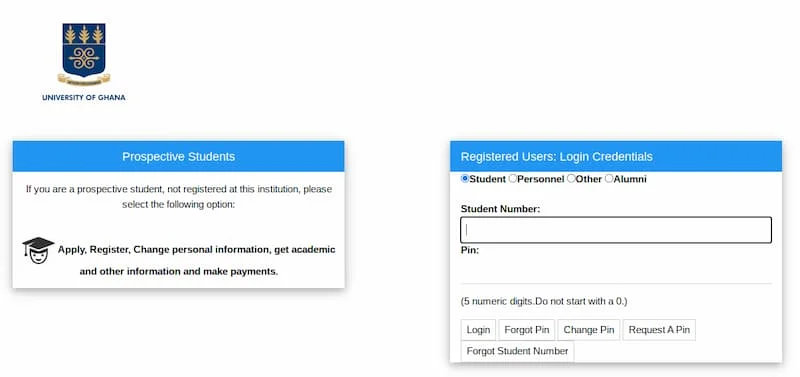
- Visit the MIS Web link.
- Type in your UG Student ID Number and UG 5-digit PIN. Then click on “Login” to enter the registration system.
- Click on “Registration” under the Student iEnabler (on the left side of the screen).
- Click on “Submit Registration”.
- Then click on the “blue letters” under “Qualification Code” and select “Register for This Qualification.”
- Click on “Save and Continue” and register for GCCR101-General Course Confirming Registration by clicking on the small box close to GCCR101.
A. FOR COLLEGE OF BASIC AND APPLIED SCIENCES & COLLEGE OF HEALTH SCIENCES STUDENTS ONLY
- Online registration is through the MIS Web. Click here to access the MIS Web.
- Then click on “Registration” under the Student iEnabler (on the left side of the screen).
- Click on “Submit Registration”.
- Then click on the “blue letters” under “Qualification Code” and select “Register for This Qualification.”
- Click on “Save and Continue” and (for undergraduate freshmen) register for GCCR101-General Course Confirming Registration by clicking on the small box close to GCCR101.
- Click on “Save and Continue” to view the course you have selected.
- Then click on “Continue” to view the Registration Cost (Academic Facility User Fee).
- Click on “Accept Registration” to complete registration.
- Click on “Printer Friendly Format” and print proof of registration.
- Remember to click on LOG-OUT to EXIT the system, especially if you used a public computer for the process
B. FOR COLLEGE OF HUMANITIES & COLLEGE OF EDUCATION STUDENTS ONLY
Registration Of Core Courses, UGRCs, and HERCs

1. University of Ghana Required Courses (UGRCs): 3 credits per semester
In the first semester, students must enroll in any of the following University-required courses:
- UGRC 110 Academic Writing I – 3 credits
- UGRC 150 Critical Thinking and Practical Reasoning – 3 credits
- (In the second semester, another UGRC must be taken)
2. Humanities and Education Required Courses (HERCs): 3 – 4 credits per semester
- In the first semester, students must enroll in any of their bouquet-based prescribed Humanities and Education Required Courses. In most cases, students can select a HERC to take from 4-6 courses listed on their registration page after logging.
- Courses offered as HERC, including French Language, normally carry three (3) credits per semester. All the other foreign language courses carry only 2 credits per course. As such, a student who wishes to select a foreign language HERC must take 2 conjoined foreign language courses from the list. Such a student will therefore earn four credits of HERC for the semester.
- Apart from French, Foreign language courses are only available in the first semester. (In the second semester, another HERC must be selected from the same list as presented in the first semester.
Step 4: Residential Registration Online (Resident Students Only)
A new random bed assignment system for freshmen will be implemented for the 2023/2024 academic year. Opting for random allocation after your academic registration, on the STS portal, is crucial if you are interested in accommodation on campus.
More information will be provided in due course. Note that this can be done only after payment of fees and academic registration. The procedure for online residential registration is as follows:
- Click on “Residence Registration” under the Student iEnabler(on the left side of the screen).
- Click on “Submit Residence Registration”.
- Then click on the year (in blue).
- There will be a display confirming the Hall and Room number.
- Click on “I Accept” to confirm.
- Print the Proof of Residential Registration and keep it for your records.
- Report to your Hall of Residence for further assistance.